

Tutorial of Gemini Architecture
From our previous tutorial on compiling a logical program, you might be wondering how our move compiler works and how we can write programs that have the minimal number of moves. In this tutorial, we go over the structure of our move compiler and how you might optimize your program.
Preliminaries: Fixed-Lane Architecture
Section titled “Preliminaries: Fixed-Lane Architecture”One of the primary distinctions for our move compiler is that we employ a “fixed-lane” architecture, which gives us the advantage of limiting the number of moves that we need to calibrate. We define an architecture as the layout of the SLM sites as well as the connectivity between SLM sites. To illustrate the architecture for Gemini, we visualize it below.
from bloqade.lanes.arch.gemini.logical import get_arch_spec as get_logical_arch_specfrom bloqade.lanes.visualize.arch import ArchVisualizer
ArchVisualizer(get_logical_arch_spec()).plot_interactive()
You’ll see in the above architecture that we have a 5 by 4 grid of SLM sites with specified horizontal and vertical spacing between sites.
To define movement paths between SLM sites, we can create buses to do so. You can see an example of a bus by clicking on Word Buses > ID 0 · zone 0 · word bus 0 in the above visualization tool. This bus tells us that we can move up to 5 atoms from the source to the target SLM sites. The buses are also bidirectional, so in this case, you can move atoms from left to right sites, or from right to left sites.
Continuing with the same bus as an example, you might not choose to move all atoms in this bus (maybe because some of the SLM sites are empty). Thus, for a given bus, we may choose to only move a subset of the atoms. It is then useful to define a term for one path within a bus; we call this a lane. Thus, for a particular atom move, it is defined by the bus that it takes, and the lanes that it uses.
Note that a consequence of the fixed lane architecture is that, instead of moving from any SLM site to any other SLM site in one move, we may have to take multiple moves (in this case, two). This illustrates the tradeoff between more calibration (additional buses) versus less moves required. For many applications, we may not need to calibrate arbitrary moves, so having a fixed-lane architecture helps us identify what atom moves we need to calibrate.
Optimizing a Gemini Program
Section titled “Optimizing a Gemini Program”We can now proceed to thinking about how we can optimize a program for Gemini, and walk through an example kernel below.
Note that this example is fairly contrived to illustrate various aspects of our architecture/move layout, but reflects constraints you might come across when writing your programs. :)
# Define kernelfrom bloqade.gemini import logicalfrom bloqade import squin@logical.kernel(aggressive_unroll=True)def parallel_cz():    qubits = squin.qalloc(4)
    squin.cz(qubits[0], qubits[1])    squin.cz(qubits[2], qubits[3])
    return logical.terminal_measure(qubits)
from bloqade.gemini import GeminiLogicalSimulator# Define our simulator device, which also contains the compilation logic for a logical kernel.simulator = GeminiLogicalSimulator()parallel_cz_task = simulator.task(parallel_cz)# Visualize the resulting Bell task.parallel_cz_task.visualize(arch_vis=True)The first thing you’ll notice is that we apply two CZ pulses instead of one, but these two CZ gates can be parallelized. We can parallelize the CZ pulses using a “broadcast” statement.
from kirin.dialects import ilist
@logical.kernel(aggressive_unroll=True)def parallel_cz_broadcasted():    qubits = squin.qalloc(4)
    squin.broadcast.cz(ilist.IList([qubits[0], qubits[2]]), ilist.IList([qubits[1], qubits[3]]))
    return logical.terminal_measure(qubits)
parallel_cz_broadcasted_task = simulator.task(parallel_cz_broadcasted)parallel_cz_broadcasted_task.visualize(arch_vis=True)You’ll now notice that, not only do we only apply one CZ pulse, but we move the physical qubits corresponding to two logical qubits in parallel. This is possible because the atom moves utilize the same bus.
You’ll also notice that the atoms take two moves instead of one. This is because of our logical architecture: to move atoms from the right to the left column in the logical architecture, the atoms must be in the right site (see Word Buses > ID 18 · zone 0 · word bus 18 for the cross-column bus). How might we attempt to minimize the number of moves required? One way is to put the atoms in the same column.
Thus, if you’d like to change the initial placement of the atoms in the architecture, you can use the qalloc_at kernel to manually specify the locations that qubits are allocated. qalloc_at uses the slots as depicted in the following picture as locations that logical qubits can be allocated at.
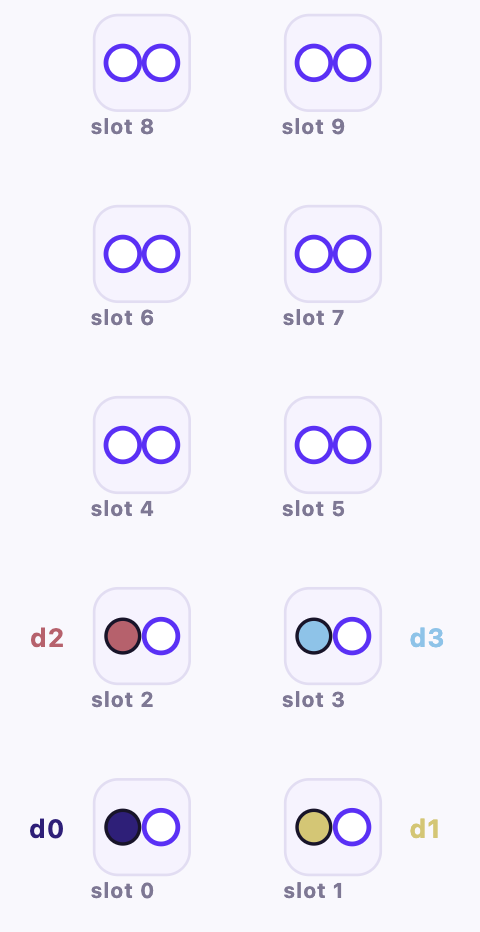
The above picture depicts the current locations on the logical architecture that qubits are allocated at. In this example, we might choose to put qubits 0 and 1 in the same column, and qubits 2 and 3 in the same column to reduce the number of moves.
@logical.kernel(aggressive_unroll=True)def parallel_cz_broadcasted_explicit(): # Allocates the first logical qubit at slot 0, the second at slot 2, the third at slot 1, and the fourth at slot 3. qubits = logical.qalloc_at(ilist.IList([0, 2, 1, 3])) # Apply the same gates and measurement as before. squin.broadcast.cz(ilist.IList([qubits[0], qubits[2]]), ilist.IList([qubits[1], qubits[3]])) return logical.terminal_measure(qubits)cz_explicit_alloc = simulator.task(parallel_cz_broadcasted_explicit)cz_explicit_alloc.visualize(arch_vis=True)Now, we can see that the atoms only require one move to go to the target SLM site to do a CZ gate. However, you’ll notice that we have to do two moves: moving one logical qubit down, and then another, when the move path is the same, so in principle, these two moves can be parallelized. Indeed, there is no fundamental reason why those moves cannot be parallelized, but due to AOD capacity constraints on Gemini (there is a limit on the number of columns that we can move), we cannot do those two moves in parallel.
However, we can work around this constraint by instead putting all of the atoms in the same column, as we see below.
@logical.kernel(aggressive_unroll=True)def parallel_cz_broadcasted_explicit_samecol(): # Allocates the first logical qubit at slot 0, the second at slot 2, the third at slot 4, and the fourth at slot 6, where all logical qubits are in the same column. qubits = logical.qalloc_at(ilist.IList([0, 2, 4, 6])) # Apply the same gates and measurement as before. squin.broadcast.cz(ilist.IList([qubits[0], qubits[2]]), ilist.IList([qubits[1], qubits[3]])) return logical.terminal_measure(qubits)cz_explicit_samecol = simulator.task(parallel_cz_broadcasted_explicit_samecol)cz_explicit_samecol.visualize(arch_vis=True)We now see that we can move all atoms from their source to destination sites in one move, with one CZ layer. This is taking advantage of the fact that within a column, we have full bipartite connectivity, and for Gemini, each bus moves atoms with the same move path.